






Working from home has become a normal part of life for many professionals. A well-designed home office helps you stay focused, comfortable, and productive throughout the day. Whether you work remotely full-time or occasionally, creating a dedicated workspace can improve both your performance and overall well-being.
These home office setup ideas will help you build a workspace that supports efficiency while reflecting your personal style. From choosing the right furniture to organizing your desk, small improvements can make a significant difference in your daily routine.
Choose the Right Location
Create a Dedicated Workspace
Selecting the right location is the first step toward building an effective home office. Choose a quiet area with minimal distractions where you can concentrate on your work. If possible, separate your workspace from high-traffic areas to maintain better focus during meetings and important tasks.
A dedicated office also helps create a clear boundary between work and personal life. This separation makes it easier to stay productive during working hours and relax after your day ends.
Take Advantage of Natural Light
Natural light improves mood, reduces eye strain, and creates a more pleasant working environment. Position your desk near a window whenever possible to benefit from daylight. If natural light is limited, use adjustable LED desk lamps that provide bright and comfortable illumination. Good lighting also improves video call quality and reduces fatigue during long work sessions.
Invest in Comfortable Furniture
A supportive chair and a sturdy desk are essential for a productive workspace. Choose an ergonomic office chair that provides proper back support and encourages healthy posture throughout the day. Sitting comfortably helps reduce neck, shoulder, and lower back discomfort.
Your desk should offer enough space for your computer, documents, and office supplies without feeling crowded. An adjustable standing desk can also provide flexibility by allowing you to alternate between sitting and standing.
Keep Your Workspace Organized
An organized office helps you stay focused and reduces unnecessary distractions. Use desk organizers, storage drawers, shelves, and filing systems to keep important documents and supplies within easy reach. A clutter-free desk creates a cleaner and more professional work environment. Managing cables with clips or cable organizers also improves the appearance of your workspace while preventing tangled wires.
Upgrade Your Technology
Reliable technology is essential for working efficiently from home. A fast computer, high-speed internet connection, quality webcam, and noise-canceling headset improve communication and productivity. Investing in a second monitor also makes multitasking easier by providing additional screen space. Wireless keyboards and ergonomic mice increase comfort while keeping your desk neat and organized.
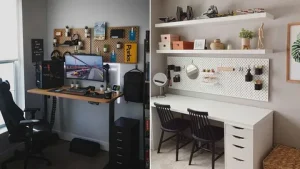
Add Smart Storage Solutions
Storage plays an important role in maintaining an efficient office. Floating shelves, filing cabinets, and storage baskets help maximize available space while keeping frequently used items organized. Labeling folders and containers also makes it easier to find important documents quickly.
If your office space is limited, choose multifunctional furniture with built-in storage to reduce clutter without sacrificing functionality.
Personalize Your Workspace
Adding personal touches makes your office feel more welcoming and inspiring. Decorative items such as artwork, indoor plants, family photos, or motivational quotes create a pleasant atmosphere without overwhelming the space.
Plants also improve indoor air quality and add a refreshing natural element to your workspace. Simple decorations can boost creativity while making long workdays more enjoyable.
Reduce Noise and Distractions
A quiet environment improves concentration and productivity. Noise-canceling headphones help block background sounds during meetings or focused work sessions. If outside noise becomes distracting, consider using soft background music or white noise to create a calmer atmosphere.
Communicating your working hours with family members or roommates also helps minimize interruptions throughout the day.
Maintain Good Ergonomics
Proper ergonomics reduce physical strain during long working hours. Position your monitor at eye level to avoid neck discomfort, and place your keyboard and mouse where your arms remain relaxed. Keeping your feet flat on the floor also supports better posture.
Taking short breaks to stretch and move around every hour helps reduce stiffness and improves circulation. Small ergonomic adjustments contribute to long-term comfort and better overall health.
Common Home Office Mistakes to Avoid
Many people work from couches or beds for extended periods, which often leads to poor posture and reduced productivity. Creating a dedicated workspace encourages better focus and supports healthier working habits.
Another common mistake involves overcrowding the office with unnecessary furniture or decorations. Keeping your workspace simple and organized creates a cleaner environment that supports concentration and efficiency.
Conclusion
These home office setup ideas can help you create a workspace that improves comfort, organization, and productivity. By choosing ergonomic furniture, maintaining an organized desk, upgrading your technology, and adding personal touches, you can build an office that supports both your professional goals and personal well-being. A thoughtfully designed home office not only makes daily work more enjoyable but also helps you stay focused and efficient throughout the year.


