






The modern professional landscape is shifting rapidly toward remote work and digital entrepreneurship. Millions of creators, writers, and marketers now manage complex corporate campaigns directly from their own homes. However, attempting to execute high-level strategic tasks from a crowded kitchen counter introduces massive daily friction. These shared residential zones contain continuous domestic distractions and poor lighting conditions that destroy your creative momentum.
To maintain peak efficiency, you must transition away from temporary workspaces entirely. Designing a dedicated, high-performance office environment acts as a powerful catalyst for your professional output. This comprehensive guide outlines the absolute best home office setup ideas to transform your daily workflow. You will discover practical strategies to optimize your bodily ergonomics, streamline your hardware, and engineer a space built for deep focus.
Prioritizing Structural Ergonomics to Protect Your Physical Stamina
The absolute structural foundation of a high-performance workspace centers entirely on human ergonomics. When you spend upwards of eight hours a day researching market trends, a poorly configured desk ravages your body. It triggers chronic lower back strain and tightens your shoulder alignment smoothly. These physical issues cause persistent tension headaches that completely derail your evening productivity.
Investing in a premium, adjustable ergonomic task chair stands as the single most critical upgrade for your layout. Look for a seating option that offers dedicated lumbar support and a pneumatic lift system. Adjust the seat height so your feet rest completely flat on the floor structure. Your knees should bend at a clean ninety-degree angle to distribute your body weight evenly. This smart configuration takes intense mechanical pressure off your lower spine and hips immediately.
Complement your new seating structure by elevating your primary display screen to the correct anatomical height. The top third of your computer monitor must sit directly at horizontal eye level. If you work primarily from a laptop device, place it on a sturdy riser stand or a stack of heavy books. Pair this elevated laptop with an external keyboard and mouse resting on your desk surface below. This critical separation ensures your neck remains perfectly straight during long focus blocks. It prevents you from slouching forward into a destructive posture when exhaustion hits.
Mastering the Minimalist Desk Layout to Eliminate Cognitive Friction
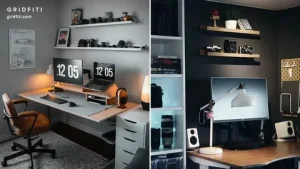
Your immediate physical desktop layout exerts a massive, silent influence over your daily mental focus. A chaotic workspace littered with tangled charging cords, scattered papers, and random coffee mugs triggers subconscious cognitive overload. Every piece of visible clutter forces your brain to make tiny visual choices constantly. This chaotic process drains your limited willpower reserves long before your scheduled lunchtime.
Adopt an aggressive minimalist approach to your primary workspace surface to shield your mind from distraction. Keep only your core digital tools on top of your desk structure. Your computer monitor, keyboard, mouse, and a clean physical notebook are the only items you truly need. Implement a comprehensive cable management strategy to hide ugly wires completely from your field of vision. Secure a power strip beneath your desk frame using heavy-duty adhesive tape. Route individual device cords through neoprene cable sleeves or plastic clips smoothly.
Furthermore, clear your desk surface completely at the conclusion of every single afternoon workflow session. File away physical documents into closed drawer units immediately. Wipe down the surface thoroughly to remove dust and dirt. Leaving a pristine, empty workspace waiting for you the next morning removes massive psychological resistance. This clean habit allows you to slide into your high-priority content creation or campaign analysis immediately. You avoid wasting valuable morning energy cleaning up yesterday’s operational mess.
Engineering Optimal Lighting and Visual Conditions for Deep Focus
The lighting conditions within your workspace layout directly dictate your cognitive energy levels and active visual focus. Working in a dimly lit space forces your optical muscles to strain continuously to read digital text. This continuous strain accelerates mental fatigue and causes sudden dips in your alertness. Conversely, harsh overhead fluorescent bulbs can trigger painful migraines and cause blinding glare on your display screen.
Position your primary desk structure directly adjacent to a natural light source, such as a large window layout. North- or south-facing windows supply soft, diffused sunlight throughout the afternoon. This setup avoids casting harsh, direct shadows across your workspace. Natural daylight anchors your internal circadian rhythm securely, boosting your morning alertness and supporting deep sleep cycles later. Ensure your computer monitor sits at a right angle to the window to prevent contrast washing.
To supplement natural light during late-night editing or writing sessions, integrate a dedicated monitor light bar. A space-saving monitor light bar clips directly onto the top edge of your screen frame. This device projects downward illumination across your keyboard area precisely. This targeted lighting provides crisp visual contrast exactly where you need it without bouncing light back into your eyes. It eliminates digital eye strain completely, allowing you to maintain absolute precision during extended creative tasks.
Separating Your Professional Workspace from Residential Zones
For digital creators and independent marketers, drawing a sharp distinction between career tasks and personal life represents a massive psychological challenge. When your office sits inside your living room, your subconscious mind struggles to unwind completely. The home begins to feel like a high-stress corporate environment, leading to chronic anxiety.
If space allows, establish your workspace layout inside a distinct room featuring a solid, closeable door structure. Closing the door at the end of the workday creates an invaluable physical and psychological boundary line. It signals your central nervous system that the professional pressure is officially over. This simple action allows you to transition fully into family or relaxation time.
If your residential layout forces you to work within a multi-purpose room, utilize modular physical barriers. Deploy a tall folding screen or a dense vertical bookstore unit to shield your desk from view. Once your hard cutoff hour arrives, execute a deliberate shutdown ritual immediately. Close your open browser tabs, shut your laptop lid firmly, and step completely away from the zone. This clean separation protects your personal well-being, ensuring you return to your desk the next morning fully recharged.
Conclusion
Building a remarkably productive home office setup does not require a massive financial investment. True professional sustainability occurs through the steady accumulation of smart ergonomic choices, minimalist spatial habits, and optimized environmental lighting. Adjust your monitor height today, clear away surface cable clutter, prioritize natural daylight, and draw firm boundary lines. These simple adjustments require minimal physical effort but compound into massive creative breakthroughs and enduring peace of mind. Commit to optimizing just one aspect of your workspace environment tonight. You will enjoy a more focused, vibrant professional lifestyle tomorrow.