






Managing dozens of online accounts has become a normal part of everyday life. Most people use separate accounts for email, banking, shopping, social media, streaming services, and work. Remembering a unique password for each account can quickly become overwhelming. As a result, many people reuse the same password across multiple websites, creating a serious security risk.
This is where password manager apps become incredibly useful. These applications securely store your login credentials, generate strong passwords, and automatically fill them in when you visit trusted websites. Instead of memorizing dozens of complex passwords, you only need to remember one master password. Choosing one of the best password manager apps makes it much easier to improve your online security while simplifying your daily digital life.
Why You Should Use a Password Manager
Cybercriminals frequently target weak or reused passwords because they provide easy access to multiple accounts. If hackers obtain one password through a data breach, they often try the same credentials on banking websites, email accounts, and social media platforms. Therefore, using unique passwords for every account has become one of the most effective ways to protect your personal information.
A password manager eliminates the need to remember every password yourself. It stores your credentials inside an encrypted vault and automatically fills them in when needed. This approach encourages stronger password habits while reducing the temptation to reuse simple passwords across different websites.
Features to Look for in a Password Manager
Strong Security and Encryption
Security should always be the first consideration when choosing a password manager. The best applications protect your passwords using advanced encryption that keeps your data secure even if someone gains access to the stored files. Reliable providers also follow strict security standards and regularly update their software to defend against new threats.
Many password managers also use zero-knowledge architecture. This means the company cannot view your stored passwords because only you control the encryption key. As a result, your sensitive information remains private and secure.
Password Generation and Auto-Fill
Creating strong passwords manually can take time, especially when every account requires a different combination of letters, numbers, and symbols. Password managers solve this problem by generating highly secure passwords automatically. These passwords are difficult for attackers to guess while remaining easy for the application to store.
Auto-fill features also improve convenience without reducing security. Instead of typing usernames and passwords repeatedly, the password manager enters them automatically after verifying the website. This saves time while reducing typing errors during login.
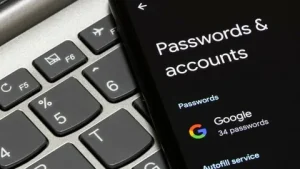
Best Password Manager Apps
1. 1Password
1Password has earned a strong reputation for combining excellent security with an intuitive interface. It allows users to store passwords, credit card information, secure notes, and important documents inside an encrypted vault. The application also supports secure password sharing, making it a practical choice for families and business teams.
The platform works across Windows, macOS, Android, iPhone, and major web browsers. It also includes features that alert users about weak, reused, or compromised passwords. Consequently, many individuals and businesses consider 1Password one of the most complete password management solutions available.
2. Bitwarden
Bitwarden offers an excellent balance between affordability and security. It provides a generous free plan while delivering advanced features that many competing products reserve for paid subscriptions. Users can securely store unlimited passwords and synchronize them across multiple devices with ease.
Because Bitwarden uses open-source software, security experts continuously review its code for vulnerabilities. This transparency builds trust while helping improve long-term security. It remains an outstanding option for individuals who want powerful protection without spending a large amount of money.
3. Dashlane
Dashlane combines password management with several additional security features. Along with storing passwords securely, it monitors the dark web for compromised credentials and alerts users if their information appears in known data breaches. These proactive notifications help users update vulnerable accounts before criminals exploit them.
The application also includes a password health dashboard that identifies weak or reused passwords. This makes it easier to strengthen your overall online security. Dashlane offers a clean interface that both beginners and experienced users can navigate comfortably.
4. NordPass
NordPass was developed by the team behind NordVPN, making it a trusted choice for many security-conscious users. The application stores passwords, payment information, and personal notes while protecting everything with strong encryption. It also generates secure passwords automatically and supports biometric authentication for faster access.
Its simple design makes daily password management straightforward. Whether you use a smartphone, tablet, or desktop computer, NordPass keeps your credentials synchronized across devices. This convenience makes it an excellent choice for users who frequently switch between different platforms.
5. Keeper Password Manager
Keeper focuses on enterprise-grade security while remaining easy enough for personal use. It protects passwords with advanced encryption and offers secure storage for sensitive documents, photos, and payment information. Businesses also benefit from detailed administrative controls and secure password sharing.
Keeper regularly undergoes independent security testing to verify its protection standards. This commitment to security has helped establish its reputation among both individual users and organizations that require reliable password management.
Benefits of Using Password Manager Apps
Password managers offer much more than simple password storage. They help users create stronger passwords, reduce login errors, and improve account security across every online service. Because the software remembers your credentials, you no longer need to write passwords on paper or store them in unsecured files.
These applications also save valuable time during daily internet use. Automatic login features allow you to access websites quickly while maintaining strong security. Over time, the convenience of password managers encourages better cybersecurity habits that significantly reduce the risk of compromised accounts.
Tips for Using a Password Manager Safely
Choosing a reliable password manager is only the first step. You should also create a strong master password because it protects every account stored inside the application. Avoid using personal information, dictionary words, or simple number sequences. Instead, create a long and unique passphrase that only you know.
Enable two-factor authentication whenever your password manager supports it. This additional layer of protection helps secure your password vault even if someone discovers your master password. Regularly updating important passwords and reviewing your security reports will further strengthen your overall online protection.
Common Mistakes to Avoid
Some users continue storing passwords in notebooks, spreadsheets, or plain text documents because they believe these methods are convenient. Unfortunately, these storage methods provide little protection if someone gains access to the device or physical documents. Using an encrypted password manager offers much stronger security while remaining just as convenient.
Another common mistake involves ignoring security alerts. Many password managers notify users when passwords become weak, reused, or exposed during data breaches. Responding to these warnings promptly helps prevent attackers from exploiting vulnerable accounts. Developing this habit significantly improves your long-term cybersecurity.
How to Choose the Right Password Manager
Every user has different security needs, so choosing the best password manager depends on your priorities. Some people prefer free solutions with essential features, while others value advanced tools such as dark web monitoring, secure file storage, or family account sharing. Evaluating your personal requirements before subscribing helps you select the most suitable option.
You should also consider compatibility with your devices and preferred web browsers. A password manager that works seamlessly across your smartphone, laptop, and tablet provides the best experience. Reading independent security reviews and comparing available features will help you make an informed decision.
Conclusion
Using one of the best password manager apps is one of the simplest and most effective ways to improve your online security. These applications help you create strong passwords, store sensitive information safely, and protect your accounts from common cyber threats. They also save time by eliminating the need to remember dozens of different login credentials.
Good cybersecurity starts with strong password habits, and a password manager makes those habits much easier to maintain. By choosing a trusted application, enabling two-factor authentication, and regularly updating your passwords, you can significantly reduce the risk of unauthorized access while enjoying a safer and more convenient online experience.


