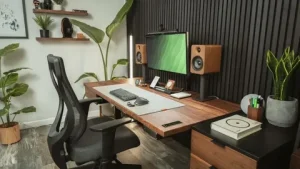
Working from home gives you flexibility, but your surroundings can have a major influence on how comfortably and efficiently you work. A poorly arranged workspace can create distractions, clutter, and discomfort, while a thoughtful home office can make it easier to concentrate throughout the day. Fortunately, you do not need a large room or expensive furniture to create a practical working environment.
The best home office setup reflects your available space, working habits, and daily responsibilities. Some people need multiple monitors and storage, while others only require a laptop, comfortable chair, and quiet corner. By focusing on comfort, organization, lighting, and functionality, you can create a workspace that supports your productivity without making your home feel like a traditional office.
Choose the Right Location
Find a Space That Supports Concentration
Start by choosing an area where you can work with as few interruptions as possible. A separate room is useful, but it is not essential because a bedroom corner, unused dining area, or quiet section of the living room can also become an effective workspace. The important thing is to select a location where you can concentrate consistently.
Consider household activity, natural light, noise, and available electrical outlets before setting up your desk. If several people live in your home, choose an area away from the busiest spaces whenever possible. Creating a dedicated working zone can also help your mind recognize when it is time to focus.
Invest in a Comfortable Desk and Chair
Make Ergonomics a Priority
Your desk and chair form the foundation of your home office, especially when you spend several hours working each day. Choose a desk that provides enough room for your computer, essential equipment, and frequently used items without becoming overcrowded. Your chair should provide appropriate support and allow you to sit comfortably while completing daily tasks.
Adjust your chair, desk, keyboard, and screen so you can maintain a comfortable working position. Avoid constantly leaning forward or looking downward at your monitor for long periods. Small adjustments to your setup can make extended work sessions feel much more comfortable.
Improve Your Office Lighting
Combine Natural and Artificial Light
Good lighting can make your home office feel brighter and more welcoming while helping you work comfortably. If possible, position your workspace near a window where you can benefit from natural daylight. However, avoid placing your screen where direct sunlight creates distracting glare.
Add a desk lamp or suitable room lighting for darker days and evening work. Different tasks may require different levels of illumination, so flexible lighting can be useful. A well-lit workspace also creates a more professional appearance during video meetings.
Position Your Computer Properly
Create a Comfortable Screen Setup
Your computer position can influence how comfortable you feel throughout the working day. Place your main screen directly in front of you and at a comfortable viewing distance so you do not need to repeatedly turn or bend your neck. Laptop users can consider a stand together with an external keyboard and mouse when working for extended periods.
If your job requires several applications to remain open simultaneously, an additional monitor may improve your workflow. However, extra screens are only useful when they genuinely support your responsibilities. Keep your technology setup simple enough to remain organized and easy to manage.
Keep Your Workspace Organized
Reduce Unnecessary Clutter
Clutter can quickly make a small home office feel distracting and difficult to use. Keep only the items you regularly need on your desk and find designated storage for everything else. A clear working surface gives you more physical space while creating a calmer visual environment.
Spend a few minutes organizing your workspace at the end of each working day. Put documents away, remove unnecessary items, and prepare anything you need for the following morning. This simple routine allows you to begin each day with a clean and organized environment.
Add Practical Storage Solutions
Give Everything a Proper Place
Good storage becomes especially important when your home office shares space with another room. Drawers, shelves, filing boxes, wall organizers, and cabinets can keep work materials accessible without allowing them to take over the surrounding area. Choose storage according to what you actually use instead of adding unnecessary furniture.
Vertical storage can work particularly well in small offices because it uses wall space rather than valuable floor area. Floating shelves can hold books, supplies, and decorative items while keeping your desk clear. Labeling containers can also make frequently used materials easier to locate.
Manage Cables and Electronics
Create a Cleaner Technology Setup
Chargers, power cables, monitor wires, and other electronics can quickly create visual clutter around a desk. Cable clips, sleeves, trays, and organizers can keep cords together and prevent them from spreading across the floor or working surface. A cleaner cable arrangement can also make your office easier to maintain.
Consider which electronic devices you genuinely need within reach. Keep essential chargers accessible while storing rarely used accessories elsewhere. Organizing your technology can make even a basic home office appear more polished and professional.
Create a Reliable Internet Setup
Support Your Daily Work Requirements
A dependable internet connection is essential for many remote workers, particularly those who attend video meetings, access cloud-based applications, or transfer large files. Positioning your workspace where your connection remains reliable can prevent unnecessary interruptions during important tasks.
If you regularly experience weak connectivity, review your router placement and available networking options. You may also want a backup plan for occasional service interruptions when your work depends heavily on internet access. Reliable technology allows you to concentrate on your responsibilities instead of repeatedly troubleshooting connection problems.
Design a Professional Video Meeting Background
Keep Your Virtual Workspace Presentable
Video meetings have become a normal part of remote work, so consider what appears behind you when your camera is active. A clean wall, organized shelf, or simple office background can create a professional appearance without requiring an elaborate setup.
Check your camera angle and lighting before important calls. Positioning your camera around eye level can create a more natural appearance, while appropriate front lighting makes your face easier to see. Keep distracting household items outside the camera frame whenever possible.
Personalize Your Home Office
Create a Space You Enjoy Using
A productive office does not need to look plain or overly formal. Personal touches such as photographs, artwork, plants, or a few decorative objects can make the space feel more welcoming. The goal is to create an environment where you feel comfortable spending part of your day.
However, avoid filling every available surface with decorations. Too many objects can create clutter and reduce usable workspace. Choose a few meaningful items that add personality without interfering with your concentration.
Consider a Small Home Office Setup
Make Limited Space Work Efficiently
You can create a functional home office even when space is limited. A compact desk, wall-mounted storage, comfortable chair, and carefully organized technology may be enough for a productive setup. Corners, alcoves, and other underused areas can often provide surprisingly useful workspaces.
Choose furniture that fits the available area rather than overwhelming it. Multifunctional pieces can provide additional value in smaller homes, particularly when the workspace needs to serve another purpose after working hours. Careful organization matters more than having a large office.
Create Clear Work and Personal Boundaries
Separate Your Job From Home Life
One challenge of working from home is knowing when the working day has ended. A dedicated office area can create a physical boundary between professional responsibilities and personal time. Even if you work from a shared room, establishing a consistent routine can provide a similar sense of separation.
Try to begin and finish work at regular times when your responsibilities allow it. At the end of the day, close your laptop, organize your desk, and step away from the workspace. This routine can make it easier to disconnect from work and enjoy your personal time.
Include Movement in Your Workday
Avoid Sitting in One Position for Too Long
Even a comfortable home office cannot replace regular movement. Remaining in the same position throughout the day can become uncomfortable and may reduce your energy. Build short movement breaks into your routine by standing, stretching, or walking around periodically.
You can also place certain items away from your desk so you naturally move during the day. If you enjoy changing positions while working, an adjustable desk may be useful, although it is not essential for everyone. The goal is to create a routine that combines focused work with regular movement.
Keep Your Home Office Flexible
Adjust the Setup as Your Needs Change
Your ideal workspace may change as your job, equipment, or working habits develop. Pay attention to recurring problems such as insufficient storage, poor lighting, uncomfortable seating, or distracting noise. Solving these issues gradually can improve your setup without requiring a complete redesign.
Avoid buying every home office accessory at the beginning. Work in the space for a while and identify what would genuinely make your routine easier. This approach can save money while helping you build an office around your actual needs.
Final Thoughts on Home Office Setup Ideas
Creating an effective home office requires a balance of comfort, organization, technology, and personal style. Start with a suitable location, supportive furniture, appropriate lighting, and a clutter-free desk. Then add storage, technology, and personal touches according to the way you actually work.
A productive workspace does not need to be expensive or complicated. Even a small corner can become an excellent home office when you organize it thoughtfully and establish clear working routines. By improving your setup gradually, you can create a comfortable environment that supports concentration, productivity, and a healthier work-from-home experience.
Maintaining a healthy equilibrium between professional ambitions and personal life feels nearly impossible in today’s hyper-connected corporate landscape.…